Showing posts with label Tips and Tricks. Show all posts

Remove Facebook Timeline With TimelineRemove

By With No comments :
Bored  or didnt like the new Facebook feature Facebook Timeline? This problem is with every one who activated facebook timeline. First peoples activated timeline than they wanted to remove it. Even facebook don’t tell users how they can Remove Facebook Timeline. Well, many friends and peoples ask me how to Remove Facebook Timeline . I now comes with this tutorial. You can now easily  Remove Facebook Timeline In Firefox and Chrome Completely. Just follow following steps.

Remove Facebook Timeline
What is Timeline?

Facebook founder Mark Zuckerberg described it as a way to “share the story of your life on a single page.”

Now that the Timeline has been released for all users. Many users I know personally doesn’t really like it and eagerly wants to revert their new Facebook timeline to an old profile layout. So for the ease of these unhappy users who just want their old profiles back, I am writing this guide.

How To Get Back Your Old Facebook Profile?

If you don’t like the new Timeline feature on Facebook and want to view profiles in the old style, then TimelineRemove is the perfect extension for you. This tiny, but handy tool disables the new Facebook timeline feature and restores the classic look, without changing the timeline behavior for other visitors of your Facebook profile.

The extension basically works by hiding the timeline, so you can view your own and others’ profiles in the old style.

TimelineRemove works automatically once installed, and a button is added to the toolbar that lets you toggle the timeline on and off, whenever you want.

Once you have enabled TimelineRemove extension, Facebook Timeline feature will never bother you again. Visit your friends profile page to check if it’s properly working for all profile pages. The extension disables the Timeline feature only. It doesn’t mean that it has been permanently removed or your friends will not see Timeline on your profile page. If you want Timeline feature back, just disable the extension from the settings and everything will be back to normal.

You can download TimelineRemove extension for Chrome browser from here. As of now, the extension is available for Google Chrome users only. I’ll update the post if I find it for Firefox and Safari. If you know any other extension or add-on to disable Facebook Timeline for Firefox and other browsers, do let me know via the comment section. I would appreciate your help. Hit the Facebook Like button in the left to share this post with your Facebook friends.

Also Check Out How To Disable Facebook Timeline

Download Windows 8 Consumer Preview

By With No comments :
A few months ago, Microsoft released the first preview of Windows 8 operating system that was called Windows 8 Developer preview. Although that version was aimed at developers but I’m pretty sure that most of you who love to get hands on with latest technology may have tasted the metro interface of the Windows 8 Developer preview as soon as it was released.


As you may know, Microsoft is all set to release the first consumer preview, and as sources say, it will be available to download at 7:30 PM (IST). Anyone can download and install Windows 8 Consumer Preview from the official website. If you have installed the previous version of Windows 8, you may already know how to install this version.

Windows 8 Consumer preview is a pre release operating system but users will get strong indications about what can be expected once the final version of Windows 8 rolls out. It’s already cleared by Microsoft that Windows 8 will run just fine on computer that meet the following minimum requirements: 1-GHZ processor, 1 GB of RAM, 16 GB of available hard disk space, and DirectX-capable graphics.

Now I guess you all are going to install Windows 8 Consumer Preview. That’s Great !! As I stated above, it’s still for testing purpose. So I suggest that you shouldn’t install Consumer Preview as your primary operating system. Talking about the major changes, Microsoft has come up with a new Windows logo. Up until now, Microsoft had used the multi-colored and multi-paned logo, but the new logo associates the blue, four-paned rectangle with Microsoft’s flagship operating system.

Moreover, Microsoft will also open its Windows Store application market for a preview on Wednesday. You heard it right that Microsoft is releasing it for public but you should be on safe side so that it won’t affect your daily tasks. I’d recommend you to install it on a virtual machine, and for that there are some good applications such as VirtualBox 4, VMware Fusion 4, WMware Workstation 8 etc.

If you don’t know about these applications, you are left with two options: either do a complete research on how to install OS on a virtual machine and then install it carefully or just forget about it and wait for the final product.


Microsoft has updated the Windows 8 official page with the download links of Consumer Preview. The Windows 8 Consumer Preview is currently available in both 32-bit and 64-bit versions in English, Chinese, French, German, and Japanese. Download Consumer Preview from the following links:

Download Windows 8 Consumer Preview 32-bit (x86)  (English) (2.5 GB)
Product Key:   DNJXJ-7XBW8-2378T-X22TX-BKG7J

Check out the official page to download Windows 8 Consumer Preview in your preferred language.

Repair Your DNS Using Avira DNS Repair

By With No comments :
The FBI back in November managed to close down a botnet that was created with the help of a malware called DNSChanger. In operation since 2007 it grew to a size of nearly 4 million infected computer systems of which about 500,000 were located in the United States. The operators manipulated the DNS system of local computer systems to redirect users to other web pages or to replace page elements such as advertisement with their own.

The configured DNS server basically tells the web browser where to look for when a web address such as www.google.co.uk is entered into the browser’s address bar. If that lookup is manipulated part or all of the page elements of the website can be replaced by the operators of the rogue DNS server.

The FBI back then replaced the DNS servers that the cyber criminals used with working servers to avoid interruption of service for users affected by the DNS server change.

These DNS servers will however be shut down on March 8th, 2012. Affected users from that day on may not be able to connect to Internet addresses anymore until they replace the DNS server with working ones.

Security company Avira, famous for their antivirus solution, has released the Avira DNS Repair-tool.

You can run the portable program on your system to see if your computer’s DNS server has been manipulated by DNSChanger.

The program will reset the DNS servers to Windows default values if it finds out that they have been manipulated by the malware.

It is alternatively possible to check for manipulation manually.

Use the shortcut Windows-r to bring up the run box. Enter cmd in there and tap on the enter key to open the command prompt. Now run the command ipconfig /all and locate the DNS Servers entry. Compare what you see there with the list of rogue DNS servers below

64.28.176.0 – 64.28.191.255
67.210.0.0 – 67.210.15.255
85.255.112.0 – 85.255.127.255
77.67.83.0 – 77.67.83.255
93.188.160.0 – 93.188.167.255
213.109.64.0 – 213.109.79.255

If your DNS server IPs differ from the ones above then congratulations, you are not infected. You otherwise need to change the DNS server. While you could do that manually, you may prefer to use a program for that. You can use the Avira tool to reset the DNS Server, or a program like DNS Jumper to select a public DNS server instead.

You can download the Avira DNS Repair-Tool from the official Avira website

How To Disable Facebook Timeline

By With No comments :
It’s been a while since Facebook made available its Timeline feature to all users. People who really like this new feature are the minorities, as no one wants anymore changes in Facebook. But as time goes by, Facebook users get used to the revamped layout every time their team come up with something new to change the interface of one of the top visited websites today.

Facebook has recently stopped supporting Internet Explorer 7 browser, so it means Facebook Timeline feature doesn’t work on the IE 7, and users took advantage of the old browser to disable the Timeline. If you use Internet Explorer 7 to open Facebook, you’ll find that the browser drops the Timeline feature. Instead, the old profile interface will appear on your Facebook screen. Although you’ll see a bit extra space at the top of the Facebook wall, but it can be removed by using the FB purity script.

All of you must be having Internet Explorer 8 or higher version on your computer. Now you might be thinking how to get IE 7. Don’t worry, I have another solution to this problem. Google Chrome has recently added a built-in User-Agent Switcher in its web console that will let Chrome pretend to be a different browser. In this post, I’m going to tell you how to disable Facebook Timeline feature in Chrome, Firefox and Safari.

How To Disable Facebook Timeline In Chrome Browser:

If you’re a Chrome user, login to your Facebook account and go to any Timeline page. Now press ‘CTRL + SHIFT + I’ on your keyboard, it should open a web console across the bottom of the browser window. Now click the ‘Gear/Settings’ icon in the right-bottom corner of the browser screen. Next, you have to enable the ‘Override User Agent’ and select the Internet Explorer 7. Refresh the page to see the changes.

You’ll have to follow the above steps to get old layout back every time you visit any Facebook profile page as all it takes is a few clicks. As I stated above, you’ll have to install FBpurity script in your browser to remove the extra white space at the top of the stream.

How To Disable Facebook Timeline In Firefox Browser:

As there is no built-in User agent switcher in Firefox, you’ll first need to install User Agent Switcher Add-on in your Firefox browser. Once you’re done installing, go to any Facebook Timeline page and change the user agent as I told you above. Don’t forget to refresh the page for changes to take effect. The FP Purity script is also available for Firefox browser.

How TODisable Facebook Timeline In Safari Browser:

You can spoof your browser’s user agent to emulate IE7 quite easily with Safari. First enable the develop menu in the browser bar. To do so, go to Preference > Advanced and tick ‘Show Develop Menu in the Menu Bar’. When done, click ‘Develop’ in the top bar > User Agent and then select ‘Internet Explorer 7’, which will let Safari browser pretend it’s IE 7 and you will get the old profile layout back.

That’s it !! Those of you who don’t like the Facebook Timeline feature should definitely try the above procedure to drop the Timeline feature and get back the old profile layout on Facebook.

If it works for you, please don’t forget to share the post with your Facebook friends. Sharing is appreciated. Also, if you’re facing any problem, feel free to contact me by leaving a comment below.

Disable or Remove Annoying Ads from Yahoo! Messenger

By With 1 comment :
Yahoo! Messenger displays ads in its main window as well as in chat window and webcam window. There are many 3rd party patchers available which claim to remove ads from Yahoo! Messenger but the problem with those patchers is that they don't work with new messenger versions and you need to wait for an updated version of the patcher if you install a new version of Yahoo! Messenger.

If you are visiting this place that means you are one of those people who are tired of annoying Yahoo! Messenger ads and want to get rid of them. Congratulations, you have come to the right place.

To remove and disable ads display on Yahoo Messenger 9, follow the trick below:

1. Run Registry Editor (regedit.exe).

2. Navigate to the following registry key:
HKEY_CURRENT_USER\Software\Yahoo\pager\Locale

3. In the right panel, locate a value named Enable Messenger Ad with default value as 1. Set the value to 0.

4. Restart Yahoo! Messenger.

The ads will be disappeared from Yahoo Messenger after restarting.

Hide Relationship Status On Facebook

By With 1 comment :
Many people list their relationship status on Facebook when things are good and then don't know how to change it when things go bad. It's easy to change or hide your relationship status when you know how to do it.

The easiest way i found is:

  1. Log in to your Facebook account.
  2. Click "Profile" in the top right corner to go to your profile page. Click "Edit Profile" in the top right corner of the profile page.
  3. Select "Friends and Family" from the list on the left side of the page.
  4. Use the drop-down menu next to "Relationship Status" to change your status or to leave it blank.
  5. Click the privacy setting icon to the far right of "Relationship Status" and select "Only Me" from the drop-down menu to hide your relationship from everyone.
  6. Click "Save Changes."

Free Download Angry Birds Skin Pack For Windows 7

By With No comments :
Angry Birds is the most addictive games that can be played on almost any device. You can play this game on Windows PC, Symbian phone, Android powered Phone, iOS device and even in your Chrome browser.

If you love playing "Angry Birds" game and you are using Windows 7, then you'll definitely enjoy this skin pack.

"Angry Birds Skin Pack" is a new transformation pack for Windows 7 created by "hameddanger" @ DA which brings the cool and funny environment of Angry Birds game to your Windows Desktop.

This skin contains high quality icons, boot screen, wallpapers, logon screen, dock, toolbar and many more things, which lets you get rid of the boring environment on your computer.

You should try this skin pack, at least once. Before you install it, I suggest that you should create a restore point on your Windows machine. If you’ll be having any problem installing this skin pack, I’d recommend you to visit Hamed Danger deviant art page and follow the instructions mentioned on the page. This skin pack is available for both 32 and 64 bit Windows version. Download your preferred version from the links below.

Download Angry Birds Skin Pack (32-bit)
Download Angry Birds Skin Pack (64-bit)

Automates Private Browsing On Chrome With Ghost Incognito

By With No comments :
Ghost incognito is a Google Chrome extension that makes sure your added domains always open in incognito mode. When navigating a listed domain, the tab will open in a new incognito window. You can add more domains to the incognito list by clicking the Ghost button when visiting the website. To remove a domain, allow the extension to run in incognito window and click the icon when visiting the page. Furthermore, you can also remove the entire domain list from Ghost Incognito’s options.

Once you’ve installed the Ghost Incognito extension, its button will be added right next to the URL bar. In order to add a website to the incognito domain list, just click this button when you visit the website. The respective domain will be launched in an incognito window, and the same will happen for that particular domain in subsequent browsing sessions.

The options for Ghost Incognito are opened in a new tab. To remove all the domains from the list just click Remove all domains button.

Ghost Incognito also sets all .xxx domains to incognito mode by default. This extension is quite useful for users who want to protect their privacy. In addition to that, it can also come in handy for web developers who test new extensions and websites. Install Ghost Incognito from the link given below and start browsing in private mode.

Ghost Incognito Extension For Google Chrome

Make A Video Call From Skype To Facebook

By With No comments :
Facebook has launched the video calling functionality on the site using Skype technology. And later on, with the latest version of Skype you could chat with your Facebook friends right from the Skype. That was a great move by the companies in making the chat experience more better.

The new update : Skype 5.7 beta for Windows and Skype 5.4 Beta for Mac – doesn’t bring much to the client, but a video call button on the profile of your Facebook friends in Skype interface. This new development in the Skype-Facebook partnership makes it easier to connect with friends, family and business colleagues.

Now you don’t need to log in to your Facebook account to talk with your friends face-to-face. You can video chat with your Facebook friends pretty much the same way you use Skype. Initiating a Facebook-to-Facebook call is quite easy. All you have to do is download the latest beta version of Skype.

Once you’ve downloaded and installed the latest beta version of Skype, connect your Facebook account if you haven’t, already. When you connect your Facebook account, your Facebook friends will appear in the chat list at the left side. Select a Facebook friend and hit the video call button in Skype – your friend simply picks up the call from Facebook.

To know more about this feature, here’s the official video posted by Skype on the official blog that will tell you more about the new features of latest Skype beta version. Watch out this video.


Download Here:

Skype 5.7 Beta For Windows
Skype 5.4 Beta For Mac

Fix File Folders Become Shortcuts in Removable Media

By With 3 comments :
Have you ever met this kind of wired situation? Your file folders suddenly became shortcuts when you connect the removable media (USB pen drive, external hard drive and sd memory card etc.) to your computer and try access data in it. You have sizable files say a couple GB in the drive, but it just shows 1KB or 2KB and so on. You also tried the removable media in a different PC, still the same problem occurred. How to make the file folders accessible again or how to recover lost files first of all?

What Caused to Your Folders? 

Yes, you may already guess it - probably the virus or Trojans (like BUOUFO, QWERT etc) or autorun.inf worm. Your pen drive or memory card may be suffered or infected. As a result, the files or folders become "hidden". Sometimes you can make them visible again by switching to non-hidden mode, while most of the times you have to kill those virus or Trojans.

How to Fix Folder Shortcuts Problem? 

To start with, do not format the removable media immediately as formatting will make the data insides much harder to be recovered, and format won't be necessary to kill the virus. Sometimes it won't let you format the device. For example autorun.inf worm will stop a flash drive from being formatted. So follow the steps below and see if you can make things right.

Step 1

  • Check whether the files are not in hidden mode.
  • Click on "Start" -->Run-->type cmd and click on OK.
  • Here I assume your removable drive as G:
  • Enter this command: attrib -h -r -s /s /d g:\*.* (replace the letter g with your usb or memory card "removable drive" letter showed under "My Computer").
  • Then check if your real files will be showed. 

Note: if you have formatted the drive, simply bypass this step and go to #2 directly.

Step 2

If your files won't show. You have to use some strong anti-virus or anti-malware programs to eliminate the virus or trojans. Download freeware Malwarebytes Anti-Malware and install it on your computer. You may also find more free anti-virus programs from this post. Then connect your removable media. Run the software to perform a "Full Scan" of the drive which may contain those virus or trojans. '); Default selected option is "Quick Scan". This way should kill those problem makers. After that see if the file folders will be accessed normally.

Article Source : Data Security Freeware and Tips


Fix Blank or White Shortcut Icons on Desktop

Free Panda Cloud Antivirus Pro Download For 6 Months Subscription

By With No comments :
Panda Company is giving away the latest build of Panda Cloud Antivirus pro to all users who like the Facebook fan page of the company. Panda Cloud Antivirus is based on Collective Intelligence, a system that continuously collects and analyses viruses and other threats gathered from the community of millions of Panda users around the world.

The Panda Cloud Antivirus Pro version generally costs you around $30 if you purchase a 1 year – 1 PC license key from the official source. Today you have a chance to grab this product for free that will last 6 months after you install it on your computer. Take a look at the key features of the product.

Features of Panda Cloud Antivirus Pro Version:

  • It protects your computer against viruses, spyware, rootkits, unknown malware and malicious activity.
  • It leverages a new antivirus protection model, which differs radically from traditional antivirus solutions and is much more effective.
  • It is extremely light and fast as it delegates all work to the cloud (Collective Intelligence) and applies non-intrusive intervention techniques, detecting even new and unknown viruses.
  • It is the first antivirus to use this innovative protection model based on two key pillars: Automated, real-time file detection and classification from the cloud & An ultra-thin client.


How To Get It?

All you have to do is like the Facebook fan page of the company. Once done, you’ll be given the direct download link, if not, click the ‘Cloud AV’ link beneath the profile picture. Download the OEM installer and install it in your PC. It doesn’t require any license or activation key to activate the product for 6 months, as it’s an OEM installer with in-build license key.

If you’re tired of purchasing Antivirus programs to protect your computer. Give Panda cloud Antivirus a try. You have no excuse to ignore the offer because you don’t have to pay for the first 6 months after installing the product on your PC. Grab the offer before its too late. At the time of writing this post, the giveaway is live.

Visit Facebook Fan Page of Panda Cloud Antivirus

Makes Facebook Browsing More Secure With FB Phishing Protector

By With No comments :
Phishing is a technique that hackers and cyber criminals often employ to acquire confidential information, such as passwords, social security numbers, credit card info and much more. It is typically done through fake websites that look or feel exactly like the legitimate ones. One of the easiest methods used to hack Facebook accounts is by creating a fake login page, or by redirecting you to one.

FB Phishing Protector is a Firefox add-on that protects you from phishing scams carried through XSS injection attacks while you’re browsing the social network. It protects the users by blacklisting all script injection attempts on Facebook, thus making sure that no external domain can be contacted except safe ones. More after the break.

Currently there are only two whitelist domains that are allowed through FB Phishing Protector; Google Analytics and Google. Every time another domain tries to inject a script, the protector generates a warning pop-up, letting you know that an unknown script has been blocked.

Facebook Apps can also be fake, and can even prompt you to give them your account details or redirect you to a Facebook-look-alike. This handy add-on will provide you with a more secure Facebook browsing experience and will guard you against such phishing attempts as well. FB Phishing Protector is similar to our previously-reviewed Nophish For Firefox, but the latter provides protection against a much larger network. Visit the link below to check it out.

Install FB Phishing Protector

Apply Windows 8 Theme In Windows XP

By With No comments :
The developer’s version of Windows 8 is already out on the Microsoft’s website for download. You can download this developers version Windows 8 and make your own applications for the Windows 8 Operating System. Since Windows 8 developer’s edition has come out internet has been flooded with the free application for Windows 8 operating system. The most striking feature till now about the Windows 8 apart from its performance has been its UI and its themes. Windows 8 operating system comes with metro UI theme. The metro UI themes organizes all the applications that are installed in your operating system in the form of tiles. Now you can install the metro UI that comes with Windows 8 in your windows XP also.

8 Skin Pack for XP which will help you to change the theme of your Windows XP to Windows 8’s theme. The various components in the metro UI theme like Start Screen and the Logon Screen, Start Screen Tiles, Start Screen Tiles Fonts, shell styles, icons, boot logos, buttons, Charm Sidebar, Charm Sidebar Item Hover, Network Charm Item Hover and Charm Sidebar will be added or changed in Windows XP.

When you will launch this application it will install the Windows 8 theme in Windows XP. You will only have to install the application on your Windows XP and restart your system. After you restart your system the new theme of Windows 8 will be enabled on your Windows XP. The application is vary reliable and safe to use as it will back up all the files that it will modify so that able to restore your original settings. In case you are trying to install this software please make a restore point on your Windows XP system before installing the software.

8 Skin Pack for XP - Download Here

Clickable Rotating Banners Ads

By With No comments :
Rotating banner ads allows you to create one banner with multiple advertisements. Using this method gives you more revenue in a smaller space. With user-friendly configurable options, create free rotating banner ads and display them on your web page in a matter of minutes. The banners can hold several different advertisements, which give you more room for other revenue ads or projects. Some services can also create a rotating banner ad for email, forums or blogs.


<script type="text/javascript">
var imgs1 = new Array("http://www.iobit.com/partner/aff/ASC_468X60.jpg","http://www.refererx.com/images/refererx468x60.gif");
var lnks1 = new Array("https://secure.avangate.com/order/cart.php?PRODS=4537179&QTY=1&AFFILIATE=3356","http://tinyurl.com/3jbfk5m");
var alt1 = new Array("Free Advanced SystemCare","RefererX - Make Money Autopilot");
var currentAd1 = 0;
var imgCt1 = 2;
function cycle1() {
if (currentAd1 == imgCt1) {
currentAd1 = 0;
}
var banner1 = document.getElementById('adBanner1');
var link1 = document.getElementById('adLink1');
banner1.src=imgs1[currentAd1]
banner1.alt=alt1[currentAd1]
document.getElementById('adLink1').href=lnks1[currentAd1]
currentAd1++;
}
window.setInterval("cycle1()",3000);
</script>
<a href=""http://www.iobit.com/partner/aff/ASC_468X60.jpg"" id="adLink1" target="_top">
<img src="https://secure.avangate.com/order/cart.php?PRODS=4537179&QTY=1&AFFILIATE=3356" id="adBanner1" border="0" width="468" height="60"></a>


Note:

  • var imgs1 – defines the images url, edit each url with your own banner image url
  • var lnks1 – defines the link the banner will redirect to when clicked
  • var imgCt1 – defines the number of banner you want rotating
  • window.setInterval – defines the rotating time, 1,000 = 1 second
Source: DoNothingMoney

Stop Facebook, Friends To Share Your Online Data, Information

By With 1 comment :
Facebook is no doubt one of the biggest social network on internet across different countries, but the another biggest problem with facebook and its apps is that it there are chances that these apps and facebook might be sharing your private data including what you post and share on facebook, you can read more here on how facebook apps might leak your facebook data.


In order to stop facebook, its apps and your facebook friends to share your confidential private data on facebook you can go through the steps mentioned below.

There are many ways with which your facebook data may get leaked out like friends might expose information when they use apps. In order to control what they can share and what not, use the facebook settings to control the categories of information people can bring with them and you will also need to control which facebook apps can share and what they can share about you.

1. Login to facebook

2. Go to facebook Privacy Settings

3. Under facebook privacy settings, click Apps and Websites

4. Now you can disable apps which you think could be leaking your facebook data

5. You can change how people bring your info to apps they use

6. You can also disable facebook instant personalization feature which lets you see relevant information about your friends the moment you arrive on select partner websites

You should know on Facebook, your name, profile picture, gender, networks, username and user id (account number) are always publicly available, including to apps. Also, by default, apps have access to your friends list and any information you choose to make public. So, with the above settings you can control about most of your data you have uploaded on facebook and protect it from getting leaked by default.

Tips to Increase Ranking and Website Traffic

By With No comments :
It is worth cataloguing the basic principles to be enforced to increase website traffic and search engine rankings.

  •  Create a site with valuable content, products or services.
  • Place primary and secondary keywords within the first 25 words in your page content and spread them evenly throughout the document.
  • Research and use the right keywords/phrases to attract your target customers.
  • Use your keywords in the right fields and references within your web page. Like Title, META tags, Headers, etc.
  • Keep your site design simple so that your customers can navigate easily between web pages, find what they want and buy products and services.
  • Submit your web pages i.e. every web page and not just the home page, to the most popular search engines and directory services. Hire someone to do so, if required. Be sure this is a manual submission. Do not engage an automated submission service.
  • Keep track of changes in search engine algorithms and processes and accordingly modify your web pages so your search engine ranking remains high. Use online tools and utilities to keep track of how your website is doing.
  • Monitor your competitors and the top ranked websites to see what they are doing right in the way of design, navigation, content, keywords, etc. 
  • Use reports and logs from your web hosting company to see where your traffic is coming from. Analyze your visitor location and their incoming sources whether search engines or links from other sites and the keywords they used to find you.
  • Make your customer visit easy and give them plenty of ways to remember you in the form of newsletters, free reports, reduction coupons etc.
  • Demonstrate your industry and product or service expertise by writing and submitting articles for your website or for article banks so you are perceived as an expert in your field.
  • When selling products online, use simple payment and shipment methods to make your customer’s experience fast and easy.
  • When not sure, hire professionals. Though it may seem costly, but it is a lot less expensive than spending your money on a website which no one visits.
  • Don’t look at your website as a static brochure. Treat it as a dynamic, ever-changing sales tool and location, just like your real store to which your customers with the same seriousness.

6 Simple Steps To Configure Privacy On Google+

By With No comments :
A Guide to Taming Privacy Concerns Around Google+ by ZoneAlarm Blog has put together an interesting 6-step guide for new people joining Google+ and how they can protect their privacy on a social network that claims to have way more privacy controls than Facebook, yet you can’t have private profiles.

Google+ now has 20 million users worldwide in just 2-3 weeks after it’s launch in their invite-only field test. And as it grows, the concern for privacy and keeping yourself protected from cyber-criminals also increase.

Check out the various steps below to ensure your privacy is safe on Google+.

Turn On Back Facebook Individual Emails Notifications

By With No comments :
Facebook has started to roll out new feature for all the facebook users gradually, as if now when some one comments on the thread you commented or some one comments on your uploaded photo etc you instantly get a email notification for the same, with a link to your facebook thread.


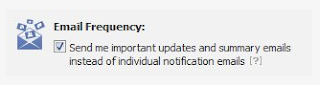
Now they have automatically convert this feature and now you will get a summary of notifications on your facebook profile, rather than getting individual email notifications as shown in the image below.

In case if don’t like this feature, You can turn individual emails back on and restore all your original settings at any time at this facebook page, you will need to login with your facebook credentials. Uncheck the checkbox which says – Send me important updates and summary emails instead of individual notification emails.

How To Make Google Chrome Always Open In Incognito Mode

By With No comments :
One of the nice features in Google OS is the guest mode that automatically defaults to Incognito mode.  This means that guests to your home don’t have to worry about revealing what websites they’ve visited or any of their private information.

If you want to recreate a similar effect on your PC i.e. each time you start Google Chrome it automatically starts in privacy mode, then this is easy to achieve:


  1. Right-click on the icon(s) you use to start Google Chrome and click on ‘Properties’
  2. In the window that opens up find the target line and at the end of the current entry add ‘–incognito’ at the end of the entry.  Remember to leave a space between …chrome.exe and –incognito
  3. Click Ok

Six Ways To Make People Like You

By With No comments :
Most of us want to be liked by others.

The trouble that the vast masses of humanity have with this is that they run smack into their own selfishness. Because of their own self-fixation, they end up repelling the very people they want to like them.

If you want to have more success in your relationships here are six simple things you can do.

1. Become genuinely interested in other people.

A simple way to make a good impression.The expression one wears on one's face if far more important than the clothes one wears on one's back. Actions speak louder than words, and a smile says, " I like you. You make me happy. I am glad to see you." You must have a good time meeting people i f you expect them to have a good time meeting you. You don't feel like smiling? Then what? Two things. First, force yourself to smile. If you are alone, force yourself to whistle or hum a tune or sing. Act as if you were already happy, and that will tend to make you happy. "Action seems to follow feeling, but really action and feeling go together; and by regulating the action, which is under the more direct control of the will, we can indirectly regulate the feeling, which is not." -William James. Happiness doesn't depend on outward conditions. It depends on inner conditions. It isn't what you have or who you are or where you are or what you are doing that makes you happy or unhappy. It is what you think about it. "There is nothing either good or bad," said Shakespeare, "but thinking makes it so." Your smile is a messenger of your good will. Your smile brightens the lives of all who see it. To someone who has seen a dozen people frown, scowl or turn their faces away, your smile is like the sun breaking through the clouds.

2. Smile.

If you don't do this, you are headed for trouble he average person is more interested in his or her own name than all the other names on earth put together. Remember that name and call it easily, and you have paid a subtle and very effective compliment. But forget it or misspell it-and you have plac e yourself at a sharp disadvantage. Whenever you meet a new acquaintance, find out his or her complete name and some facts about his or her family, business or political opinions. Fix all these facts well in mind as part of the picture, and the next time you meet that person, even if it was a year later, you will be able to shake hands, inquire after the family, and ask about the hollyhocks in the backyard. Sometimes it is difficult to remember a name, particularly if it is hard to pronounce. Rather than even try to learn it, many people ignore it or call the person by an easy nickname. Most people don't remember names, for the simple reason that they don't take the time and energy necessary to concentrate and repeat and fix names indelibly in their minds. If you don't hear the name distinctly say excuse me I didn't get your name clearly. Then, if it is an unusual name, ask how it is spelled. Use the person's name several times in the conversation; try to associate it in your mind with the person's featur es, expression and general appearance. Then, when you are alone write the name down on a piece of paper, look at it, and concentrate on it, fix it securely in your mind, in this way you will gain an eye impression of the name as well as an ear impression.

3. Remember that a person's name is to that person the sweetest and most important sound in any language.

An easy way to become a good conversationalist listen intently; listen because you are genuinely interested. That kind  of listening is one of the highest compliments we can pay anyone. The chronic kicker, even the most violent critic, will frequently soften and be subdued in the presence of a patient, sympathetic listener-a listener who will be silent with the irate fault-finger dilates like a king cobra and spews the poison out of his system. Be more eager to hear what a person has to say then even they are to tell it. Many people prefer good list eners to good talkers, but the ability to listen seems rarer than almost any other good trait. All we want when we are in trouble is a friendly, sympathetic listener to unburden yourself. That is frequently all the irritated customer wants, and the dissat isfied employee or the hurt friend. If you want to know how to make people shun you and laugh at you behind your back and even despise you, here is the recipe: Never listen to anyone for long. Talk incessantly about yourself. If you have an idea while the other person is talking, don't wait for him or her to finish: bust right in and interrupt in the middle of a sentence. If you aspire to be a good conversationalist, be an attentive listener. To be interesting, be interested. Ask questions that other persons will enjoy answering. Encourage them to talk about themselves and their accomplishments.

4. Be a good listener. Encourage others to talk about themselves.

How to interest people the royal road to a person's heart is to talk about the things he or she treasures most. Make an effort to find out what interests the person then get them talking about it. Talking in terms of the other person's interests pays off for both parties. When asked what reward he got from it, Mr. Herzig responded that he not only received a different reward from each person but that in general the reward had been an enlargement of his life each time he spoke to someone.

5. Talk in terms of the other person's interests.

How to make people like you instantly. Ask yourself " What is there about him or her that I can honestly admire?" That is sometimes a hard question to answer, especially with strangers. You want approval of those with whom you come in contact. You want recognition of your true worth. You want a feeling that your are important in our little world. You don't want to listen to cheap, insincere flattery, but you do crave sincere appreciation. So let's obey the Golden Rule, and give unto others what we would have others give unto us. How? When? Where? The answer is all the time, everywhere. Use little phrases such as "I'm sorry to trouble you, ___." "Would you please ___?" "Won't you please?" "Would you mind?" "Thank you." The unvarnished truth is that almost all the people you meet feel themselves superior to you in some way, and a sure way to their hearts is to let them realize in some subtle way that you recognize their importance, and recognize it sincerely. Talk to people about themselves and they will listen for hours.

6. Make the other person feel important-and do it sincerely.

Remember that a person's name is to that person the sweetest and most important sound in any language.
Be a good listener. Encourage others to talk about themselves.
Talk in terms of the other person's interests.
Make the other person feel important-and do it sincerely